Building zahidui.com: Why I Chose Sanity CMS for My Developer Portfolio
• Zahid Ul Islam
As a Frontend Engineer, choosing the right stack is crucial. Here is why I moved to a Headless architecture with Sanity CMS to power zahidui.com, focusing on structured content, Next.js integration, and pure performance.
As a Frontend Engineer, my portfolio isn't just a showcase of my work—it is my work. It is the first line of code a potential client or employer sees. When I decided to overhaul zahidui.com, I faced a common dilemma: Do I hardcode everything for speed? Do I use a traditional monolith like WordPress? Or do I choose a modern, scalable architecture?
I chose Sanity CMS.
For a developer focused on performance, scalability, and the "Headless" revolution (especially with frameworks like Next.js), Sanity wasn't just a choice; it was the only logical answer. Here is why I bet my personal brand on it.
1. "Content as Data" – The Engineer’s Mindset
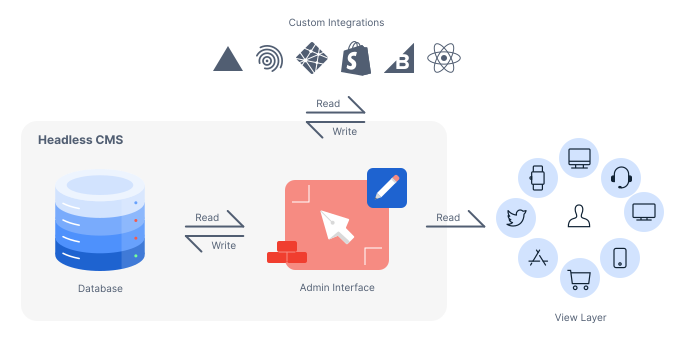
Traditional CMS platforms treat content as HTML blobs mixed with layout. That’s messy. Sanity treats content as structured data.
For zahidui.com, I didn't want my project descriptions trapped in a rigid WYSIWYG editor. I wanted them as JSON objects that I could query and manipulate. Sanity’s approach allows me to decouple my content from its presentation completely. This means:
- Reusability: I can write a project case study once and pipe that data into a blog post, a "Featured Work" section, or even a future mobile app, without rewriting a single line.
- Clean Code: My frontend receives clean data, not messy, pre-rendered HTML tags that break my CSS grid.
2. Unmatched Developer Experience (DX) with GROQ
If you have spent years working with SQL or GraphQL, Sanity’s query language, GROQ (Graph-Relational Object Queries), is a breath of fresh air.
Instead of fetching a massive payload of unnecessary data, I can laser-focus my queries. For my portfolio's homepage, I can request only the title, slug, and main image of my last three projects.
- Efficiency: Smaller payloads mean faster page loads.
- Power: I can filter, order, and slice data directly in the query, reducing the amount of JavaScript logic I need to write on the frontend.
3. Seamless Integration with Next.js
Given my focus on the modern React ecosystem, the synergy between Sanity and Next.js is unbeatable.
Sanity provides first-class support for Next.js, allowing me to leverage:
- Static Site Generation (SSG): I can build my portfolio pages at compile time for lightning-fast performance.
- Incremental Static Regeneration (ISR): When I add a new project to the CMS, my site updates in the background without a full rebuild.
- Visual Editing: With Sanity’s presentation tools, I can click on a section of my live portfolio and be taken directly to that field in the CMS.
4. The Studio is Fully Customizable
As a frontend engineer, I hate being locked into a generic UI. Sanity Studio is an open-source React application. This means I can customize the CMS interface just as easily as I build the frontend.
For zahidui.com, I can build custom input components—like a specialized "Tech Stack" selector or a code block previewer—that fit my specific workflow. The CMS adapts to me, not the other way around.
5. Performance and Image Optimization
We all know that unoptimized images kill Core Web Vitals. Sanity’s image pipeline is a lifesaver.
When I upload a high-res screenshot of a dashboard or an e-commerce site I’ve built, Sanity automatically:
- Serves it via a global CDN.
- Converts it to modern formats like WebP.
- Allows me to request specific dimensions dynamically in the URL (e.g.,
?w=800&h=600).
This ensures that zahidui.com scores high on Lighthouse performance audits, which is critical for SEO and user experience.

6. Future-Proofing My Career
Using Sanity signals to the industry that I am not just coding; I am architecting. It shows I understand the shift toward Composable Web Architecture.
Whether I am building a high-risk e-commerce platform or a simple blog, the principles remain the same: separate concerns, prioritize data structure, and deliver fast user experiences. Using Sanity for my personal site is my way of practicing what I preach.
Final Thoughts
Building zahidui.com with Sanity CMS has given me the freedom to focus on what I love: writing code and building interfaces. It handles the heavy lifting of content management without getting in my way.
If you are a developer looking to build a portfolio that scales with your skills, stop hardcoding your content. Go Headless. Go Sanity.